You are sending blind.
You click send on 500 emails and stare at a spinner. No idea how many went out, which failed, or how long it will take.
Bulk Email Tool
Self-hosted bulk email with live per-message tracking and crash-proof resume. It runs on your machine, sends through the email account you already pay for, and keeps a record of every single message. One-time price. No subscription.
What it is
Bulk Email Tool is a self-hosted bulk email sender built by COPG Global Private Limited. You install it on your own Windows, macOS or Linux computer, and it sends through the SMTP account you already have — Gmail, Outlook, Microsoft 365, Zoho or a company mail server.
It does two things that most cheap bulk mailers do not. It streams the result of every individual message to your screen as it is sent. And it writes progress to disk after every email, so a campaign interrupted by a crash, a power cut or a closed laptop resumes from the exact message it stopped on — nobody receives the same email twice.
It is sold as a one-time licence rather than a monthly subscription, and it is designed for businesses sending 50–500 recipients per campaign — not for high-volume marketing at tens of thousands per day.
| Product | Bulk Email Tool (also sold as Bulk Mailer by COPG) |
|---|---|
| Category | Self-hosted bulk email sender |
| Vendor | COPG Global Private Limited, Bengaluru, India |
| Deployment | Installed on your own computer or server — not a hosted SaaS |
| Sending method | Your own SMTP account — Gmail, Outlook / Microsoft 365, Zoho, or a company mail server |
| Operating systems | Windows, macOS and Linux |
| Pricing model | One-time licence from ₹6,749; licence with setup and training ₹17,999 |
| Built with | Node.js, Express and Nodemailer — no database required |
| Best for | 50–500 recipients per campaign, sent occasionally rather than daily |
| Standout capability | Resumes an interrupted campaign from the exact email it stopped on, with no duplicate sends |
| Not included | Mail merge, unsubscribe handling, bounce processing, open tracking, scheduling |
The problem
That question, at 11pm, staring at a progress bar that has not moved.
You click send on 500 emails and stare at a spinner. No idea how many went out, which failed, or how long it will take.
The internet drops, the laptop sleeps, your provider hits a limit at email 300 — and you either start over, or work out by hand where it stopped.
Sending the same email twice to a client makes you look careless. Copy-pasting into BCC is not a system, and it leaves no record.
Why people buy it
Pillar 01
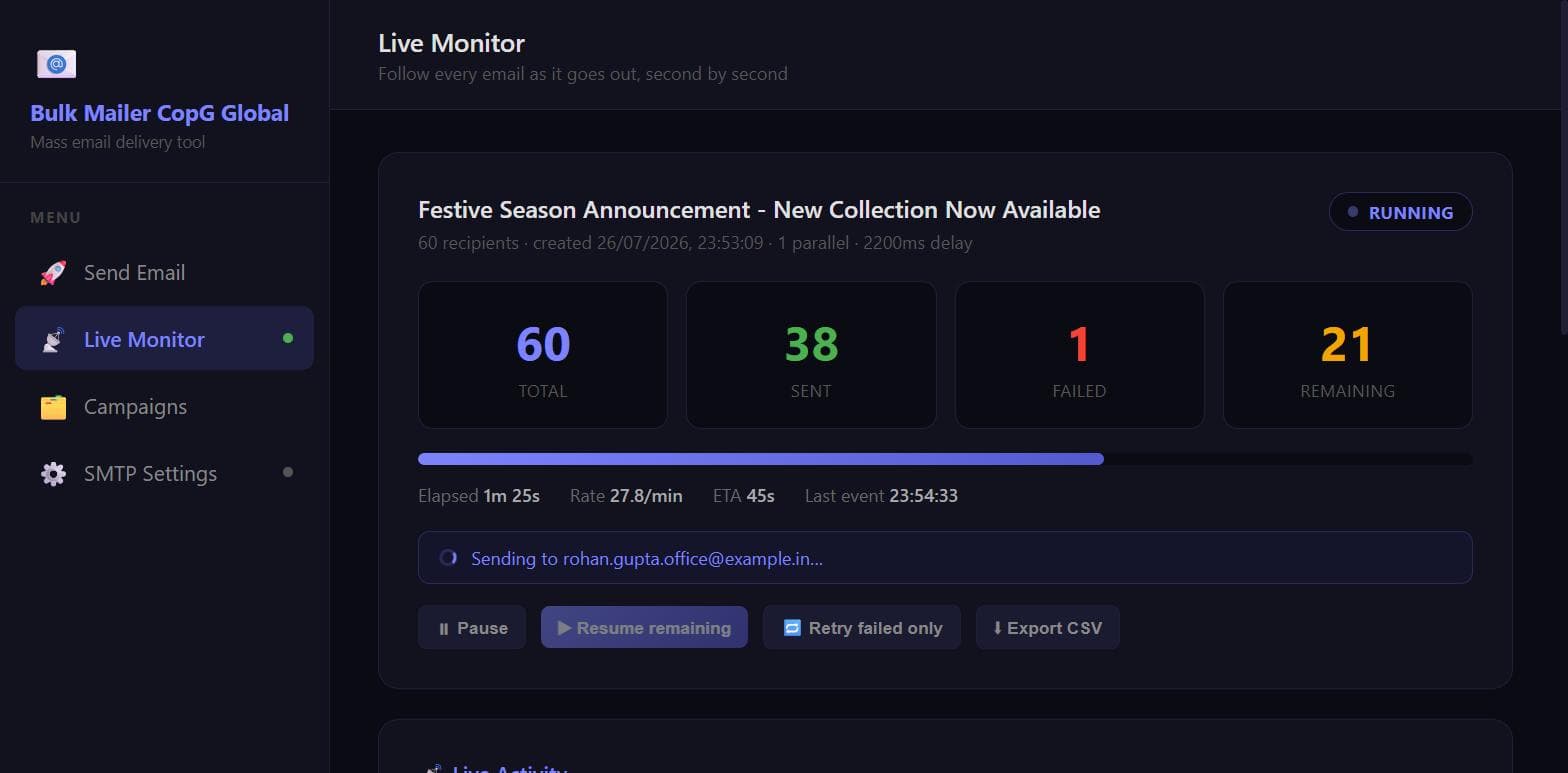
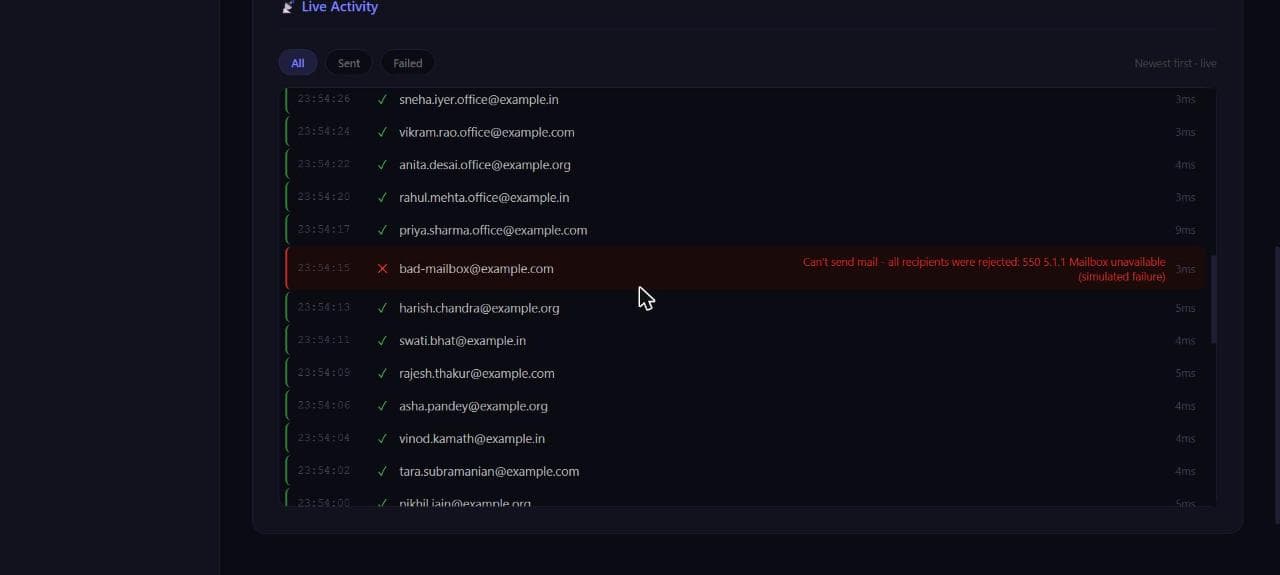
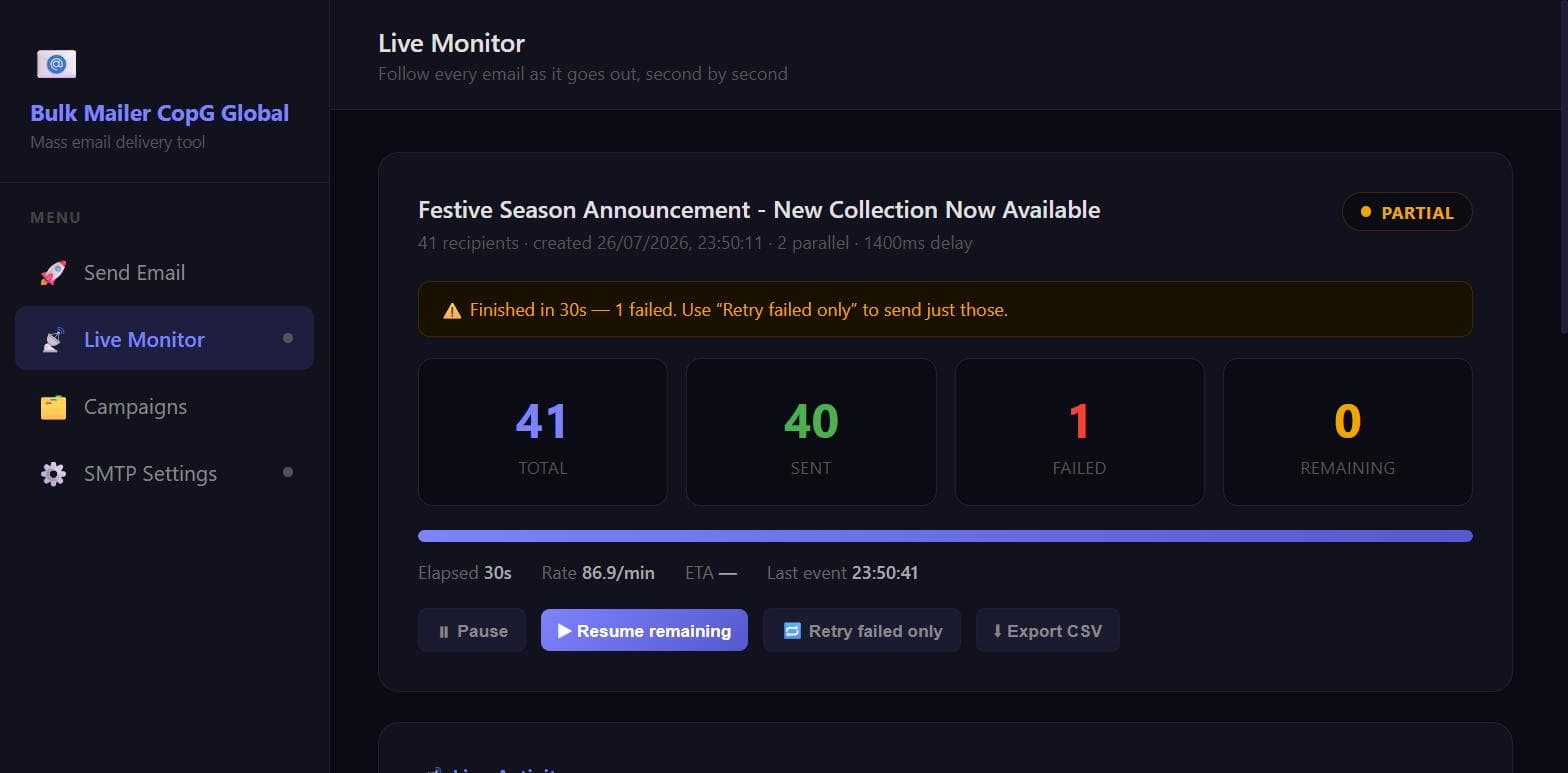
Not a progress bar. A live feed, updating per message: the address going out right now, then each result with the exact time, how many milliseconds it took, and the mail server's own error text if it failed.
Pillar 02
Progress is written to disk after every single email. Crash, power cut, closed laptop, restarted server — open the Campaigns page and press Resume. Already-delivered addresses are never contacted again.
Pillar 03
It runs on your computer or server and sends through your own email account. Recipient lists stay on your disk. No third-party platform holds your customer data, and there is no monthly bill.
Live tracking
Most tools give you a progress bar and a shrug. This gives you a live feed: the address being sent right now, then every result as it lands — with a timestamp, how many milliseconds it took, and the mail server’s own words when something fails.
We tested it by breaking it
We started a 20-recipient campaign and killed the server process outright at email 12 — no graceful shutdown, no cleanup, the equivalent of pulling the plug. On restart the campaign was flagged interrupted. Pressing Resume queued exactly 8 emails. Not 20. The receiving mail server’s own log confirmed it: 20 deliveries to 20 unique addresses, zero duplicates.
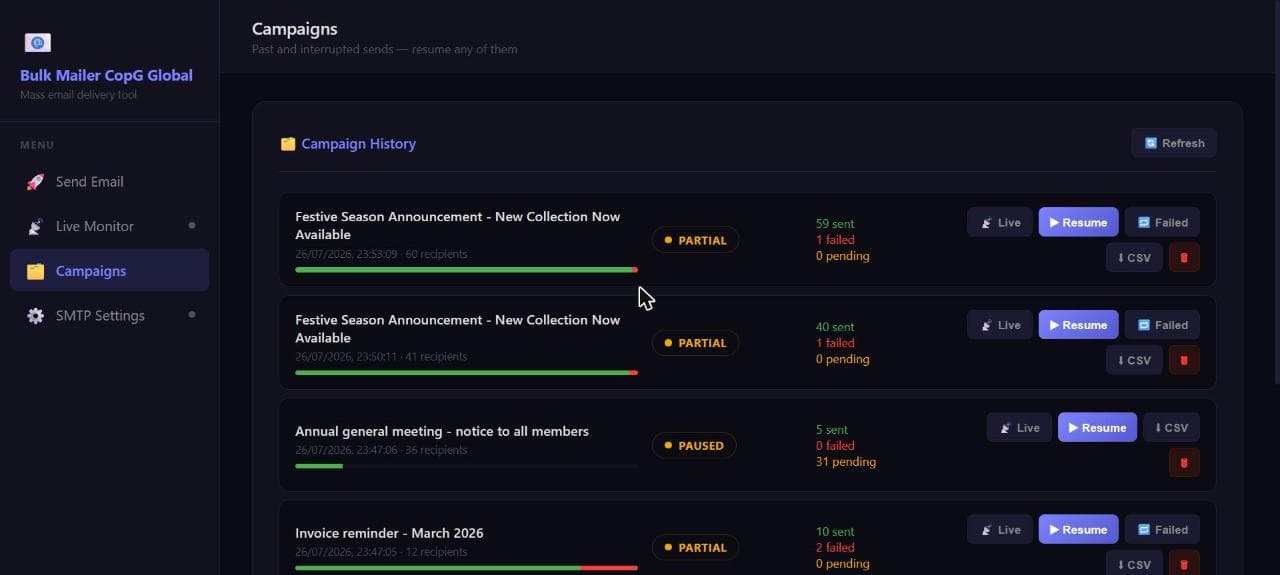
Paused at 8 of 25; Resume queued exactly the remaining 17.
12 sent, 2 failed — retry re-attempted only the 2. The successful 12 were never contacted again.
Export a CSV per campaign: email, status, timestamp, duration and the error message.
Everything it does
Every item below is built and tested. What is not in the product is spelled out further down the page too.
How it works
Install Node.js, unzip the tool, run two commands. Or let us do it for you — that is what the setup package is.
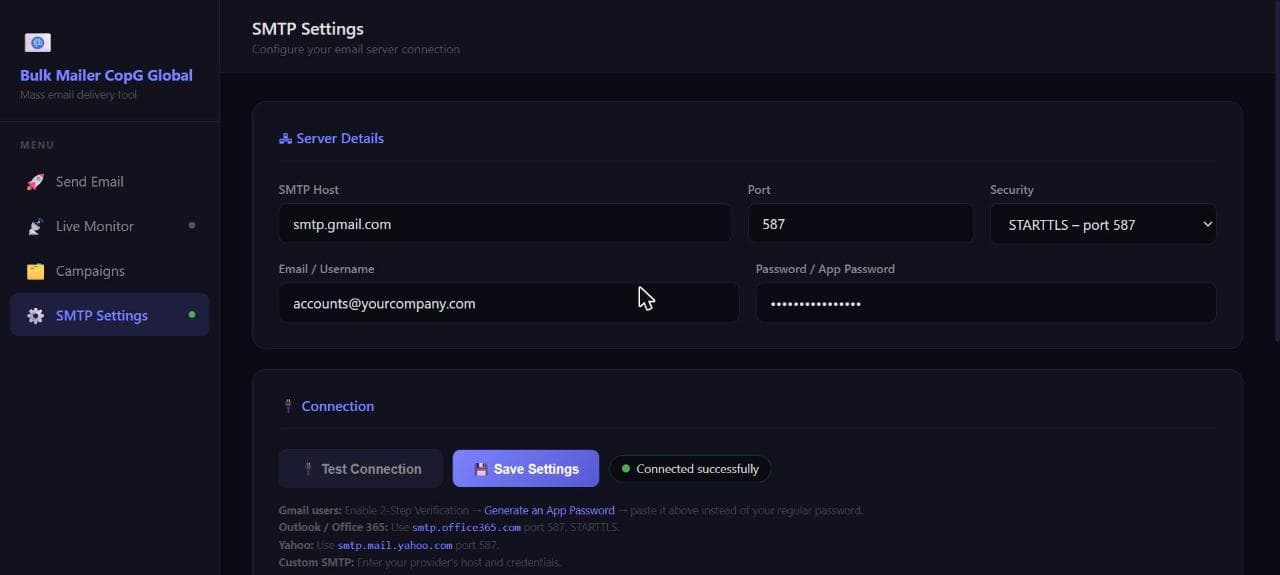
Enter your mail server details, click Test Connection, save. Presets for Gmail, Outlook and Yahoo are one click.
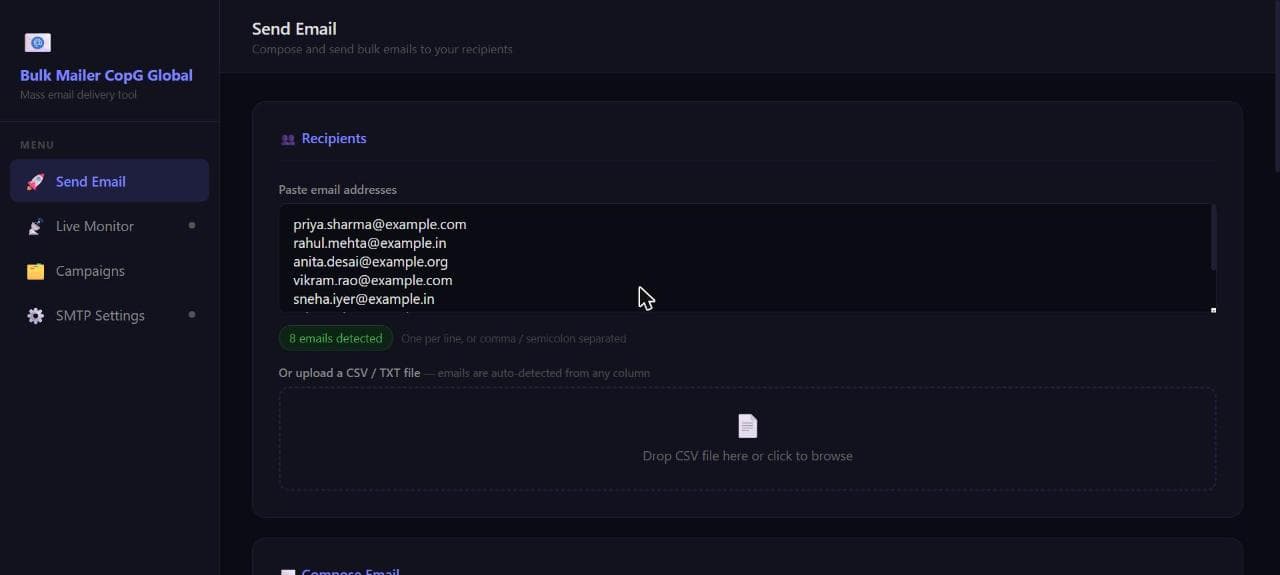
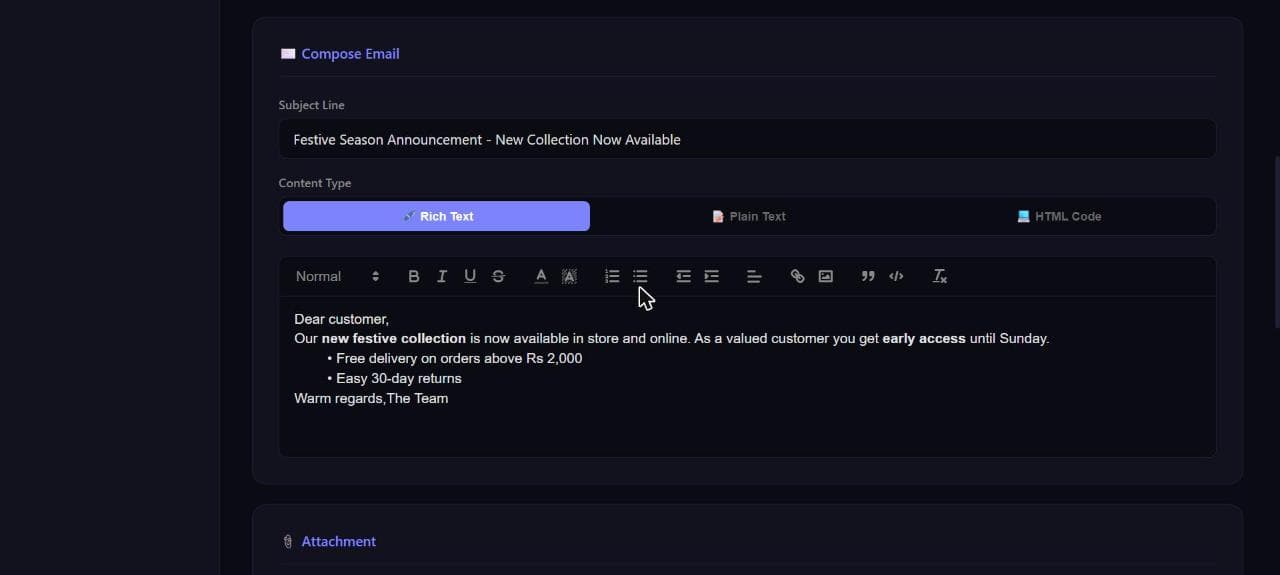
Paste addresses or upload a CSV, write the subject and message, attach a file if you need one.
Click send. The Live Monitor opens automatically and starts streaming results, message by message.
Follow it live, or close the tab entirely — it runs on your machine, not in the browser. Check the Campaigns page later.
Honest fit
Read this before you buy. Your sending volume is capped by your own mailbox, not by this software. Ordinary Gmail and Microsoft 365 accounts allow only a few hundred recipients a day, and shared hosting is often stricter. There is also no mail merge, no unsubscribe handling, no bounce processing and no open tracking. If you need any of those, a marketing platform will serve you better — and we will say so on the call.
How it compares
This is not a cheaper Mailchimp. It is the simplest way to send a few hundred emails from your own account, with proof of what happened to each one.
| Alternative | Cost | Why buyers pick this instead |
|---|---|---|
| Mailchimp / Brevo / Zoho Campaigns | Monthly subscription | No monthly fee. Your list stays on your machine. Far simpler for occasional sends. |
| Sendy | One-time, ~$69 | No Amazon SES or AWS setup needed. Works with an ordinary mailbox. Support in your language and timezone. |
| Listmonk / Mautic | Free, open source | Those need real technical skill to install and run, with no support and no setup service. |
| Excel + Outlook mail merge | Free | No live tracking, no resume, no delivery record, no retry. |
| A developer's custom script | Varies | Nothing to maintain. A real interface. Resume and reporting built in. |
Third-party pricing is indicative and may have changed — check with each vendor.
Pricing
Launch pricing — 10% off every package. The software is the smaller part of what most buyers actually need, which is why the setup package is the one we recommend.
The software package plus the full setup guide. You install it yourself.
We install it, connect it to your mail server, and send your first campaign with you.
Keep it maintained and current for the next twelve months.
You send us the list and the message. We run the campaigns.
Your branding, CRM integration, mail merge — scope agreed before we start.
Buying more than one package, kitting out a team, a school or non-profit, or the budget simply is not there? Talk to us directly and we will see what we can do. Discounts are agreed on a call — there is no coupon code.
All prices in INR and inclusive — there is no GST or any other tax added at checkout. The price you see is the price you pay. Custom development is priced from the figure shown; final scope is agreed in writing before any work begins. One licence covers your organisation on as many of its own machines as you like, but may not be resold or shared. All sales are final — we do not offer refunds on any package. Please check the requirements and the “not for you if” list above, and ask us anything before you buy. Full detail in our terms.
Your data
There is no account to create and no platform holding your list. The software runs on your computer or your server, and sends through the email account you already pay for.
One thing to know: the web interface has no login of its own. Anyone who can reach the port it runs on can operate it. Run it locally or behind an SSH tunnel — the setup guide covers exactly how, and we configure it that way for you on the setup package.
Bulk Email Tool FAQ
Anything not covered here — ask. We will tell you if the answer is no.
Yes. It sends through your existing account — Gmail, Outlook, Zoho or your company mail server.
As many as your email provider allows — usually a few hundred a day for ordinary accounts. This is built for hundreds, not tens of thousands. Check your provider's limit before a big send.
The campaign stops where it is. Reconnect, press Resume, and it continues from the exact email it stopped on. Nobody receives the message twice.
On your own computer, in the tool's folder. Nothing is uploaded anywhere.
It is never written to disk by the software. It stays in your browser — which is why resuming a campaign asks for it again.
Yes, while sending. You can close the browser though — it runs on your machine, not in the tab.
Yes — one file per campaign, any type, sent to everyone.
Yes. Any layout — it finds email addresses in any column automatically.
Yes. Windows, macOS and Linux.
No. It reports delivery, not opens — there are no tracking pixels in your emails.
Not in the current version — every recipient gets the same message. It is available as a custom development request.
Bug fixes and updates are included with an Annual Support plan.
Yes. One licence covers your organisation on as many of its own computers and servers as you like. You may not resell it, share it, or use it to send mail on behalf of another business without a separate agreement.
No. All sales are final on every package, including the licence, setup and training, annual support, managed sending and custom development. Digital goods cannot be returned, which is why the requirements, the sending-volume limitation and the features that are not included are all stated plainly on this page — so you can decide before paying. If something is genuinely broken we will fix it. Ask us anything before you buy.
Possibly — talk to us. There is no coupon code, but if you are buying more than one package, kitting out a team, or you are a school or non-profit, contact us on WhatsApp at +91 93534 64919 or email info@copg.in and we will see what we can do.
Get started
Tell us what you send and who you send it to. We will tell you honestly whether this is the right tool, and if it is, we will have it running on your machine.
Bulk Email Tool is supplied by COPG Global Private Limited “as is”, without warranty. You are responsible for the emails you send, for having your recipients’ consent, and for complying with applicable law. It is a sending tool only — it does not verify consent, process unsubscribes, handle bounces, or check your list against any do-not-contact register. COPG Global Private Limited accepts no liability for how the software is used or for anything resulting from its use. See our terms for the full version.